Monday, 26 July 2021

Webpage Optimization

Optimizing webpages

Definition – Web page or website optimisation is the practice of re-developing the code and structure of a website to ensure it makes it “easy” for search engines to find and index your website pages. It’s all about improving website performance in the search results.

Webpage optimization

Is the site “readable” by search engines?

Many web design companies focus only on the look and feel of a website. This can cause the website pages to be difficult or impossible to read by the search engine robots reducing the chances of being listed highly (or even listed) in the search engines.

If a search engine cannot find/read you then neither can your target market.

If your website:

  • Has information obscured in the code or is hard to find
  • Is badly written or the site structure is inconsistent
  • Does not have the right or sufficient content or follows standard design protocol

Then your page may not be found and…

  • The site will not be indexed (or not indexed properly)
  • The site will not be listed when a search is done on your keywords

This means VISITORS WILL NOT FIND YOUR SITE.

Web page changes and upgrades

You need to give the search engines what they want without chasing the latest technique or “black hat” trick.

The first step is to carry out a site audit – this provides the basis for upgrading or re-developing your site.

Most audits are segmented into the following areas:

Website Architecture

  • Page construction – Flash, HTML, invisible areas, Javascript
  • Menu format

Construction

  • Page, title and link re-naming
  • Tag composition
  • Analytics

Content

  • Keyword/Content optimization
  • Tagging and linking

Submissions

  • Create and submit sitemaps
  • Directory submissions

A conservative estimate is 90% of sites reviewed by us have a number of major issues that when cured can result in a traffic increase (and sales) by 2-300%.

News&Update


Wednesday, 28 April 2021

Screamingfrog - Finding orphan pages


How To Find Orphan Pages Using The SEO Spider

An orphaned page is a webpage that is not linked to internally. So it can’t be found by either a user browsing or discovered by a search engine crawling the internal links of the website alone.

Why Are They Important?

Finding orphan pages is useful because it can help identify areas of a site or important pages that have no internal links. This can obviously be an issue for users, and discovery and indexing of the pages by search engines.

Orphan pages might still be indexed due to being linked to historically or from other sources (like XML Sitemaps, or external links for example), but without any internal links, they won’t be passed internal PageRank, which will impact their scoring and organic performance in the search engines.

How to use the Screaming Frog SEO Spider to find orphan pages

The Screaming Frog SEO Spider to find orphan pages from three sources, XML Sitemaps, Google Analytics, and Search Console.

Note: To crawl the whole website and open up the configuration to integrate with the three sources, an SEO Spider licence is required.

XML Sitemaps:

1. Open Screaming Frog tool

2. Go to menu "Configuration" > Spider > XML Sitemaps

3. select "Crawl Linked XML Sitemaps"

4.  select "Crawl These Sitemaps:  (this requires a ‘Sitemap: https://www.example.com/sitemap.xml entry), or supply the destination of the XML Sitemap. This means any new orphan URLs only discoverable via the XML Sitemap will be crawled.

5. Type or copy in the website to crawl in the ‘Enter URL to spider’ box and hit ‘Start’.

6. Export Combined Orphan URLs report if you wish to export a combined list of all orphan pages discovered after finish crawling site.

The guide above should help illustrate the simple steps required to find orphan pages using the SEO Spider. For more sources to find orphan pages by  integrated Google Analytics and Search Console Google Analytics you can go to visit Screaming user guide.


News&Update

Thursday, 11 March 2021

6 steps in planning a Website

The stages of Website Development

The 6 steps we follow in website planning and design:

Site Strategy

  • What is the product/service and who are you going to sell to
  • Why should they buy from you – how are you going to be different?
  • How are you going to market online to get attention

Structure/Pagination

  • Plan what pages you need
  • What is the objective of each page – how are you going to achieve this?
  • Develop a content outline – an essay plan for each page (headings etc)
  • Who is going to produce the content and by when?

Keyword Research

  • Establish what words customers actually use to find your products / services

Briefs

Develop the design brief:

  • Who are you talking to, what are you saying, why should they listen?
  • What is their profile

Develop the copy brief

  • Identify what type of imagery is going to communicate your message

Functional Spec

  • Any site applications required and their configuration

Deliverables

  • Who is supplying what and when

Once all the plans and deliverables are agreed then we start delivering…

Please contact us for more info.


News&Update

Wednesday, 18 November 2020

Check if my site/URLs are indexed on Google (Use Search Console)

 How to use Google Search Console to check whether a specific page/url is indexed.

  1. Log into the gmail account that you use to manage this websites profile
  2. Log into Google Search Console.

    1. Scroll down until you get a “Start Now” blue button in the top right 
    2. Click Start now (you may have login again BUT check if you are working with the right gmail account on this profile.) 
    3. Go to “URL inspection” in the left menu. 
    4. Copy the URL you’d like indexed and enter it into the search field. 
    5. If that page is indexed, it’ll say “URL is on Google.” 

    6. If the page isn’t indexed, you’ll see the words “URL is not on Google.”

  3. How to get indexed by Google for “URL is not on Google.”
    1. Click the “Request indexing” button (bottom right)
    2. Wait for Google to check the URL
    3. Google now tests the URL to see if it can be indexed, Click “GOT IT” to exit

These instructions are for new pages (or updated pages) that you want indexing quickly.

BUT
…you can only submit 50 URLs for indexing per day.


Tuesday, 27 October 2020

How to Use Free Stock Photo Resources

Finding the right image is always a challenge and if you want to find a great image for free it becomes an even bigger challenge! Of course, if you have your own equipment and a flare for photography consider producing your own imagery.
We’ve listed here the best free stock photo resources with the type of Creative Commons license and whether they require attribution.

Image Licenses – Creative Commons and Public Domain
There is a myriad of information about licences, but the most popular ones are Creative Commons and Public Domain licenses.
A Creative Commons license only applies to images protected by copyright and communicates how the image can be used There may be restrictions on how you can use the image.
A Public Domain license is free for use for anyone on the Internet so the image is unrestricted. An image that is in the public domain can be declared using CCO, which means “no copyright reserved.”


Already have an image in mind?

You will need to check whether you can use the image. To do this go to How to check copyright on images.

Imagery Sources

Here are some of our favourite sources for imagery.

123RF

Attribution: Some imagery

License : CC variable

  • A stock content provider. Some photos are free, but for limited sizes.
  • Our View: Wide range of categories and option to subscribe for larger sizes.

Albumarium

Attribution: Required

License : CC 2.0

  • Beautiful imagery with a useful list of popular albums.
  • Our View: Easy to use interface.

Avopix

Attribution: Not Required

License: CCO

  • Free stock photos, videos and illustrations.
  • Our View: A great bank of images. Easy to navigate and no sign up needed.

BucketListly Photos

Attribution: Not Required

License: CCO

  • An extensive traveller with a talent for taking photos.
  • Our View: It’s a great way to travel the world. Amazing free imagery for travel websites.

Burst

Attribution: Not Required

License: CC Varies

  • Shopify have created Burst. This is a free stock photography website for websites and commercial use.
  • Our View:  Great photos, just make sure you don’t get sucked into having a shopify website.

Dreamstime

Attribution: Not Required

License: CCO

  • 69 million stock images and 19 million users.
  • Our View: No sign up needed and easy to use.

FindA.Photo

Attribution: Not Required

License CCO

  • 10,000 free stock photos.
  • Our View: Basic site. Search by keyword or by colour.

Other Sites

There are many other sites which provide imagery.


News&Update

Wednesday, 30 September 2020

How to resize an image using Online Photo Editor?

 If you want to resize an image.

We sugguest our tool : Online Photo Editor. Follow six step to resize image :

  1. Go to Online Photo Editor.
  2. Click ‘Upload from Computer’ and select your image. Click ‘OPEN.’
  3. Click ‘Resize’ from the left-hand side.
  4. Enter the required ‘Width’ or ‘Height’.  Always tick ‘Maintain Aspect Ratio’ to ensure image integrity.
  5. Click ‘Resize’.
  6. Click ‘Save’ to download the image. Add name, select file type (JPEG or PNG) and quality. Click ‘Save’.
Or see video instruction


Monday, 20 July 2020

How to check copyright on images?

If an image is copyrighted, How to check?
We sugguest TinEye image search engine. It is a great tool for identifying where images are used on the web.


Follow Five step to verify an image and identify the copyright owner.

    1. Go to "tineye.com"

    2. Enter the image URL OR upload the image.

    3. Tineye will now review where else on the web the image is used.

    4. Review the URL of the site that the photo is displayed on.

    5. If it is a photo library, news or stock photo site then do not use. If the image is on a range of misc sites then try and find the source and pass credit as necessary.


Monday, 17 February 2020

Geocoding, Embedding, Lats & longs with Google Maps


Use these Map tools to assist in creating and locating points on google maps.


Source an address using Google Maps

Google MapsIdentify an address using a google map.
1. Search using a partial address
2. Drag and drop the icon to the location
3. Cut and paste (save the address)

2020-02-17_152605


Identify Lats & Longs

Google MapsFind lats and longs either by clicking on a google map or using partial search and dragging.
  1. Save the details
  2. Email multiple searches to yourself
 

2020-02-17_152751


Embed a Google Map

Google MapsCreate an embeddable google map for your site.
Search for your location, add titles,headings, descriptions – create code,
copy and paste code into your website for a Customized google map
 

2020-02-17_152751


News&Update

Sunday, 19 January 2020

Digital marketing services and Digital marketing portfolio

imarketingonly providing a great looking website is a given, providing a website which works to develop or achieve your business objectives is always a lot harder Our business focus is to “Build your Online Business”. We are marketers with technology skills and we never forget your website is your primary marketing tool.


SEO & PPC Website Traffic
We use 3 primary Website Marketing techniques:
  1. SEO (Search Engine Optimisation)
  2. Content Marketing
  3. PPC – Google Adwords (advertising in the search engine results page)
These actions have substantially increased online traffic for our customers.
Further detail on how we carry out SEO Site optimisation and how we manage your Google Adwords programmes.
Responsive Website Design
A marketing led website that focuses on your visitors, delivering experiences that solve their problems in the process motivating them to “talk to you”.
For further detail on how we build Responsive Web Design.
Social Media Management
We have been working with small business for over 6 years solving this problem. With our clients we create the strategy and then develop and implement plans. Ultimately we look to increase brand penetration and customer engagement.
Our services are aimed to fit into a small business’s budget, and expectations. We help, advise, direct and do the work – we let you get back to what you do best – running your company.
Further details on our Social Media Marketing Services.
Email Marketing, Newsletters
Email marketing is an established successful marketing channel. There are development tools that enable well designed, cost effective email marketing campaigns to be developed in 48hrs.
For further details on our Email Marketing Services.
Web Apps & Online Tools
  • Identify visitor issues and provide tools enabling them to carry out their tasks quicker and more easily
  • Establish where savings can be made in your processes perhaps a simple tool could be developed to save you time and money?
Our team having worked in many industries and bring a great deal of knowledge to the designing and developing of online applications.
Further details on our Website Application Development
Digital Marketing Portfolio
Browse through our Creative Website Designs and  Digital Marketing portfolio.


Monday, 18 November 2019

Digital Marketing Planning and Where to invest your digital marketing budget

If you run your own business or work in marketing there is real pressure to have your products and services talked about online everywhere. How do you prioritize channels? It’s not easy, but you need to go back to your marketing plan.

Step 1 : Know your business
Goals
Before you can begin the process of choosing which marketing channel to work with you need to know your business goals, your budget and what you are prepared to do yourself.
Driving sales leads is normally the primary objective. All other goals are usually building up to this objective. Typical goals are:
  • X of e-commerce sales
  • X email sign ups
  • X on-site video views
  • X social media followers
It’s a good idea to have key goals and then some individual goals for each marketing activity.

Step 2 : Current Channel Performance
Skip over this if you’re a brand new business…
So, for each of your channels have a look at:
  • Your inbound visitor sources – use Google Analytics to track where people are coming from when they land on your site. In Google Analytics you can look at how many visitors are coming from Organic Search, Direct, Social Media and Referrals.
  • Create a channel tracking spreadsheet so you can compare channels. Typically, people compare unique visitors, sign ups, conversions to active users, conversions to paying customers and campaign spend.
And then of course, analyze to work out which channels attract the most successful customers for the least amount of money.
Step 3 : Create a Channel Plan
If you’re new to digital marketing start with 1 to 3 channels and do them well. If it’s not obvious which channel to work with then do a simple rating for each channel by:
  • Impact – the size of the opportunity, based on audience reach, search volume and other factors
  • Confidence – how confident you are in your ability to capture and convert that audience
  • Effort – how much effort you anticipate each channel will take to execute
So, lets assume I am selling Vegan Baby Food online in the UK and having already made some progress through Google Adwords I need to up my sales. Perhaps you’re trying to decide between 2 channels – paid Facebook Ads and SEO.
Impact:
Facebook – millions of users, although not all of them will be interested in vegan baby food, it is a safe assumption that most people with babies are between 20 and 45 and will be using Facebook. Potentially Facebook has impact.
SEO – The potential impact is limited by the number of people actively searching for vegan baby food online. Google Keyword Planner can help with giving you some ideas on how many people are searching on specific keywords and if you are already using Google Adwords you can obtain even more detailed information.
And of course you will need to take into account budget. Initially selection of a channel is part data, part gut feel. At some point you have to take the plunge.
So, in this instance Facebook should get a higher impact score than SEO.
Confidence:
How confident you are in your ability to capture and convert that audience
Effort:
How much effort (time and money) to make the channel work.

Step 4: Implement, Analyze and Adapt
Analyse and Adapt Gather your chosen performance data and work through the results.
Learn from mistakes and don’t be scared to pull out of a channel...View More

News&Update
 

Wednesday, 23 October 2019

Email Marketing | Keeping your site top of mind


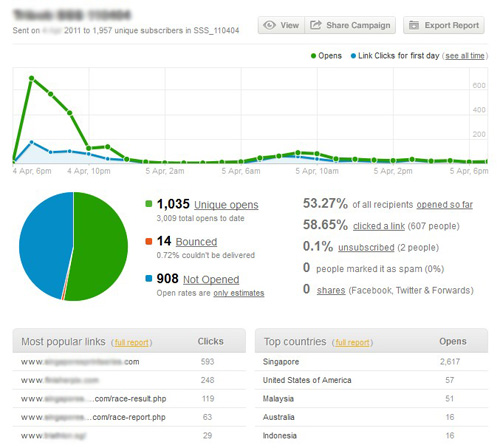
Responsive email design is one of the most effective forms of digital marketing. Email marketing, if done properly delivers significant traffic very cost effectively.

Email Marketing Generates Revenue

The typical objectives of email marketing are:

  • Top of mind (Awareness) – use a newsletter to maintain communication
  • Sales – use a eflyer with a strong proposition and a call to action
  • Branding– construct a viral email to generate awareness

Advantages:

  • Cost – Significant saving on printed mediums
  • Timing – Email marketing is almost immediateEmail marketing, if done properly delivers significant traffic very cost effectively.
  • Response – The call to action is clear: “Click here to receive this offer”
  • Effective – Email marketing enables you to communicate in real time
  • Measurable – Every element is measurable, which offer was effective, which links were clicked
  • Targeted – Your lists can be easily segmented ensuring opportunities are not wasted

Success is not an accident.

There are a myriad of actions that should be done to ensure a successful email marketing campaign.